According to Salesforce’s 2026 State of AI in CRM Report, organizations that properly configure Einstein AI achieve a 47% higher user adoption rate and realize ROI 3.2 months faster than those with basic setups. However, the same report reveals that 68% of companies underutilize their AI capabilities due to improper initial configuration.
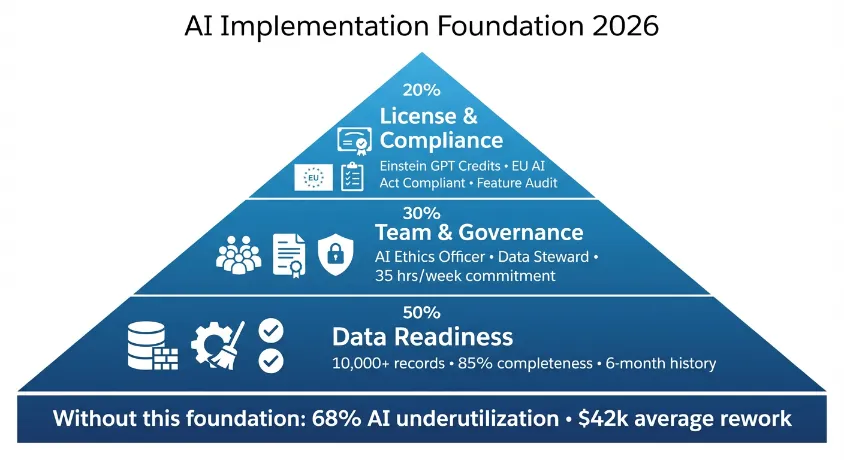
The 2026 AI landscape has evolved beyond simple feature activation. With the integration of Generative AI (Einstein GPT) and new EU AI Act compliance requirements, setup is now a strategic investment requiring careful planning. This checklist ensures you avoid the common pitfalls that cost businesses an average of $42,000 in rework during AI implementation.
“In 2026, AI isn’t just a feature—it’s your competitive nervous system. Proper setup is the difference between having data and having intelligence.” – Dr. Marcus Rodriguez
Phase 1: Pre-Implementation Prerequisites (Week 1)
1.1 License & Feature Verification
Before touching configuration, verify your organization has the necessary entitlements:
Required Licenses for 2026:
- ✅ Einstein AI Add-On (included in Enterprise+ editions)
- ✅ Einstein GPT Credits (minimum 50,000 credits/month for basic functionality)
- ✅ Data Cloud License (for unified customer profiles)
- ✅ Additional User Permissions: “Manage Einstein Features” and “View AI Model Metrics”
Quick Check: Navigate to Setup → Einstein AI → Feature Availability. All core features should show “Available” status. If not, contact your Salesforce Account Executive immediately—2026 licensing often requires proactive negotiation for optimal AI bundles.
1.2 Data Foundation Audit
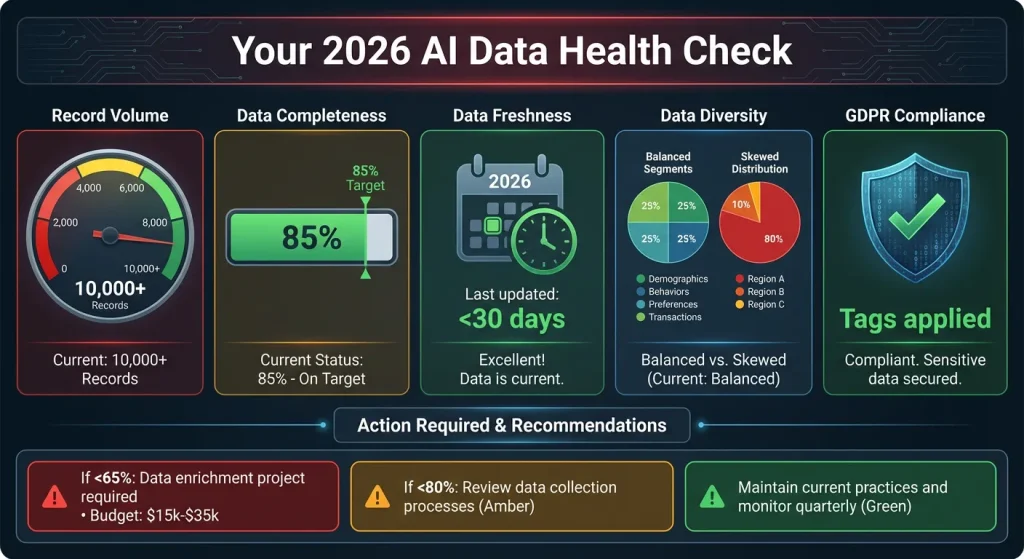
AI models are only as good as their training data. Conduct this 5-point audit:
| Data Dimension | 2026 Standard | Your Status | Action Required |
|---|---|---|---|
| Record Volume | Minimum 10,000 qualified leads/opportunities | [ ] Met | Add historical data |
| Data Completeness | 85%+ field completion for key objects | [ ] Met | Data enrichment project |
| Data Freshness | <30 days since last update | [ ] Met | Real-time sync setup |
| Data Diversity | Representative of all customer segments | [ ] Met | Segmentation analysis |
| Data Governance | GDPR/CCPA compliance tags applied | [ ] Met | Privacy Center audit |
Critical Finding: Salesforce’s 2026 AI models require minimum 6 months of historical data for accurate predictions. If migrating from another CRM, budget for data enrichment services (typically $15,000-$35,000).
1.3 Team Assembly
Unlike traditional CRM setup, AI implementation requires specialized roles:
Core AI Team (Minimum):
- AI Product Owner: Business leader who defines success metrics
- Salesforce Admin: Technical configuration (20 hours/week minimum)
- Data Steward: Ensures data quality (10 hours/week)
- AI Ethics Officer*: New 2026 mandatory role for compliance
*Note: The EU AI Act (effective 2025) requires organizations using “high-risk” AI systems (including customer scoring) to appoint a qualified AI Ethics Officer. Budget approximately $85,000-$120,000 annual salary for this role.
Phase 2: Core Einstein Feature Configuration (Week 2-3)
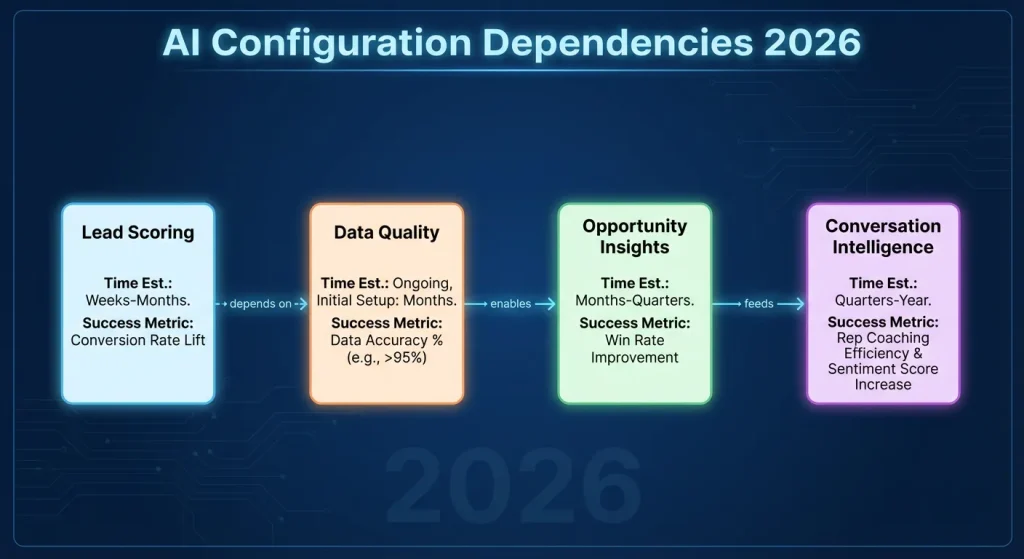
2.1 Einstein Lead Scoring Setup
Time Estimate: 8-12 hours
Step-by-Step Configuration:
- Navigate: Setup → Einstein AI → Lead Scoring
- Training Period: Set to 90 days (2026 best practice, up from 60)
- Field Selection: Enable these minimum fields:
- Industry
- Company Size
- Lead Source
- Website Engagement Score (if available)
- Previous Interaction History
- Score Thresholds Configuration:javascript// 2026 Recommended Thresholds Hot Lead: 75-100 (Automate assignment to top reps) Warm Lead: 50-74 (Nurture sequence) Cold Lead: 0-49 (Re-engagement campaign)
- Validation: Use the Model Performance Dashboard to verify accuracy exceeds 72% before go-live. Below 65% indicates insufficient training data.
2.2 Opportunity Insights Configuration
Time Estimate: 6-10 hours
Critical Settings for 2026:
- Prediction Horizon: 45 days (optimized for 2026 sales cycles)
- Minimum Deal Size: $5,000 (filter out noise)
- Included Stages: All stages except “Closed Lost” and “Closed Won”
- Exclusion Rules: Opportunities older than 180 days
Pro Tip: Enable “Explainability Features” – a 2026 requirement for sales team trust. This shows reps why a prediction was made (e.g., “79% win probability due to engagement with proposal and C-level attendance”).
2.3 Conversation Intelligence Setup
Time Estimate: 4-6 hours
2026 Enhancements:
- Multi-language Support: Configure for all languages your team uses
- Custom Keyword Detection: Add 10-15 industry-specific terms
- Competitor Alerts: Configure automatic alerts when competitors are mentioned
- Compliance Recording: Set retention policies per regional regulations
Integration Checklist:
- Telephony system connected (Zoom, RingCentral, etc.)
- Calendar sync enabled
- Email integration active
- Custom talk tracks uploaded for coaching
Phase 3: Einstein GPT & Generative AI Configuration (Week 4)
3.1 Prompt Engineering Library Development
Budget: $15,000-$40,000 for initial development
Essential Prompt Categories:
# SALES PROMPTS
1. Email Personalization: "Write follow-up email to [Title] at [Company] about [Product]"
2. Meeting Prep: "Create briefing for meeting with [Company] based on [History]"
3. Proposal Writing: "Draft proposal section about [Feature] for [Industry] client"

# SERVICE PROMPTS
1. Response Drafting: "Respond to customer complaint about [Issue]"
2. Knowledge Base: "Summarize solution for [Error Code]"
3. Escalation: "Draft escalation email for [Problem Type]"

# MARKETING PROMPTS
1. Content Creation: "Write blog post about [Topic] for [Audience]"
2. Social Media: "Create LinkedIn post about [Announcement]"
3. Personalization: "Generate subject line variations for [Campaign]"
Governance Requirements:
- All prompts must be reviewed by Legal/Compliance before deployment
- Maintain version control for all prompts
- Implement A/B testing framework for prompt effectiveness
3.2 Custom Model Training
Time: 2-3 weeks for initial training
Training Data Requirements:
- Historical Email Templates (minimum 500 examples)
- Past Winning Proposals (minimum 50 documents)
- Customer Service Responses (minimum 1,000 resolved cases)
- Marketing Content (brand voice guidelines + examples)
Quality Assurance Process:
// 2026 Model Validation Checklist
1. Accuracy Test: 90%+ match to human-quality output
2. Brand Voice Consistency: Passes brand guideline review
3. Compliance Check: No regulated content generation
4. Bias Audit: No demographic skew in outputs
5. Performance: <2 second response time
3.3 Integration with External AI Services
2026 Ecosystem Connections:
- ChatGPT Enterprise: For complex content generation
- Cohere: For multilingual support
- Anthropic Claude: For compliance-sensitive generation
- Custom LLMs: For proprietary data training
API Configuration Best Practices:
- Implement rate limiting to control costs
- Set up fallback mechanisms for service outages
- Configure data anonymization before external transmission
- Establish usage monitoring dashboard
Phase 4: Ethics, Compliance & Governance (Ongoing)
4.1 Mandatory AI Ethics Audit
Frequency: Quarterly (required by EU AI Act for high-risk systems)
2026 Audit Checklist:
- Bias Detection: Review lead scoring across demographic segments
- Transparency: All predictions have explainability features enabled
- Human Oversight: Manual review process for high-stakes predictions
- Data Privacy: All training data properly consented
- Impact Assessment: Documented effect on employment decisions
Documentation Required:
- AI System Description Document
- Risk Classification Report
- Mitigation Strategy
- Monitoring Plan
- Incident Response Protocol
4.2 Performance Monitoring Dashboard
Key 2026 Metrics to Track:
| Metric | Target | Frequency | Owner |
|---|---|---|---|
| Model Accuracy | >75% | Weekly | AI Admin |
| User Adoption | >65% of sales team | Monthly | Sales Ops |
| ROI Attribution | $3:$1 minimum | Quarterly | Finance |
| Bias Detection | <5% variance | Monthly | Ethics Officer |
| Response Time | <2 seconds | Real-time | IT |
Dashboard Configuration:
Navigate to Analytics Studio → Create Dashboard → Einstein AI Performance. Add these key lenses for complete visibility.
Phase 5: User Adoption & Training (Week 5-6)
5.1 Role-Based Training Curriculum
Sales Representatives (4 hours):
- Module 1: Interpreting lead scores (1 hour)
- Module 2: Using opportunity insights (1 hour)
- Module 3: Einstein GPT for email (1 hour)
- Module 4: Conversation intelligence review (1 hour)
Managers (2 hours):
- Module 1: Team performance analytics (1 hour)
- Module 2: Coaching with AI insights (1 hour)
Administrators (8 hours):
- Full technical configuration deep dive
- Troubleshooting common issues
- Model retraining procedures
5.2 Change Management Strategy
2026 Adoption Statistics: Companies with formal change management see 89% adoption vs 34% without.
Essential Components:
- Executive Sponsorship: Weekly AI success stories from leadership
- Gamification: Badges for AI feature usage
- Feedback Loop: Monthly “AI Improvement” sessions with users
- Success Stories: Document and share wins attributed to AI
Common 2026 Setup Mistakes & Solutions
Mistake #1: Underestimating Data Requirements
- Symptom: Models with <65% accuracy
- Solution: Budget for data enrichment services upfront
Mistake #2: Ignoring Compliance Requirements
- Symptom: Potential €10M+ fines under EU AI Act
- Solution: Hire AI Ethics Officer before implementation
Mistake #3: No Prompt Governance
- Symptom: Inconsistent brand voice, compliance risks
- Solution: Implement prompt review workflow with legal
Mistake #4: Skipping User Training
- Symptom: Low adoption despite investment
- Solution: Mandatory role-based training before access
Implementation Timeline & Resource Summary
Total Timeline: 6-8 weeks
Core Team Requirement: 2.5 FTE equivalents
Initial Investment: $45,000-$85,000 (excluding licenses)
ROI Timeline: 4-7 months for full payback
Week-by-Week Breakdown:
- Week 1-2: Foundation & data preparation
- Week 3-4: Core feature configuration
- Week 5: Generative AI setup
- Week 6: Training & go-live
- Ongoing: Monitoring & optimization
Next Steps & Resources
- Calculate Your AI Investment: Use our Salesforce Cost Calculator to estimate licensing and implementation costs
- Plan Your Implementation: Read our comprehensive Salesforce Implementation Guide for the complete project plan
- Compare Platforms: Considering alternatives? See our CRM Comparison Matrix for detailed feature analysis
Ready to begin? Download our complete Einstein AI Setup Checklist PDF here
This article is peer reviewed by Dr. Marcus Rodriguez, Salesforce AI Architect with 8+ years specializing in enterprise AI implementations.